Selling on Amazon Canada in 2027: What a US Brand Needs Before the First Shipment
.png)
If your brand already sells on Amazon in the US, most of what Canada needs is in place. Your seller account covers Canada already, your listings can carry over, and the fees follow the same structure. What changes is everything that touches the border: what your packaging has to say, who imports the inventory, how it gets there, and what happens if Amazon flags it after it arrives.
Those border steps are where brands lose money, because inventory that goes into Amazon Canada can't be shipped back to the US. This guide covers what a US brand needs to know before its first sale on Amazon.ca, what to avoid, and what to expect once you're live.
Launching on Amazon Canada at a glance
- Size the opportunity against your US sales.
- Activate the Canada account you already have.
- Bring your US listings over (same UPC, same ASIN, same reviews).
- Make your packaging and listing images compliant for Canada.
- Choose a fulfillment path: Remote Fulfillment, FBA Canada, or FBM.
- Import and ship your inventory.
- Rebuild your SKU economics in Canadian dollars.
- Send a small test shipment before the full order.
- Send traffic to your listings with Canada advertising campaigns.
The checklist near the end of this guide puts every step on one page so you can work through it with your team.
What can Amazon Canada add to your business?
Across the accounts we manage, Amazon Canada usually brings in sales equal to about 10% of a brand's US Amazon sales. A brand doing $200K per month in the US can use roughly $20K per month as a starting estimate for what Canada is worth.
That figure comes from the accounts we manage, so treat it as a planning baseline for yours. It moves with your category, how much of your catalog you bring over, and how much you invest in advertising once you launch. Use it to decide whether Canada is worth the setup work, then let your first few months of real sales replace the estimate.
Do you need a new seller account for Amazon Canada?
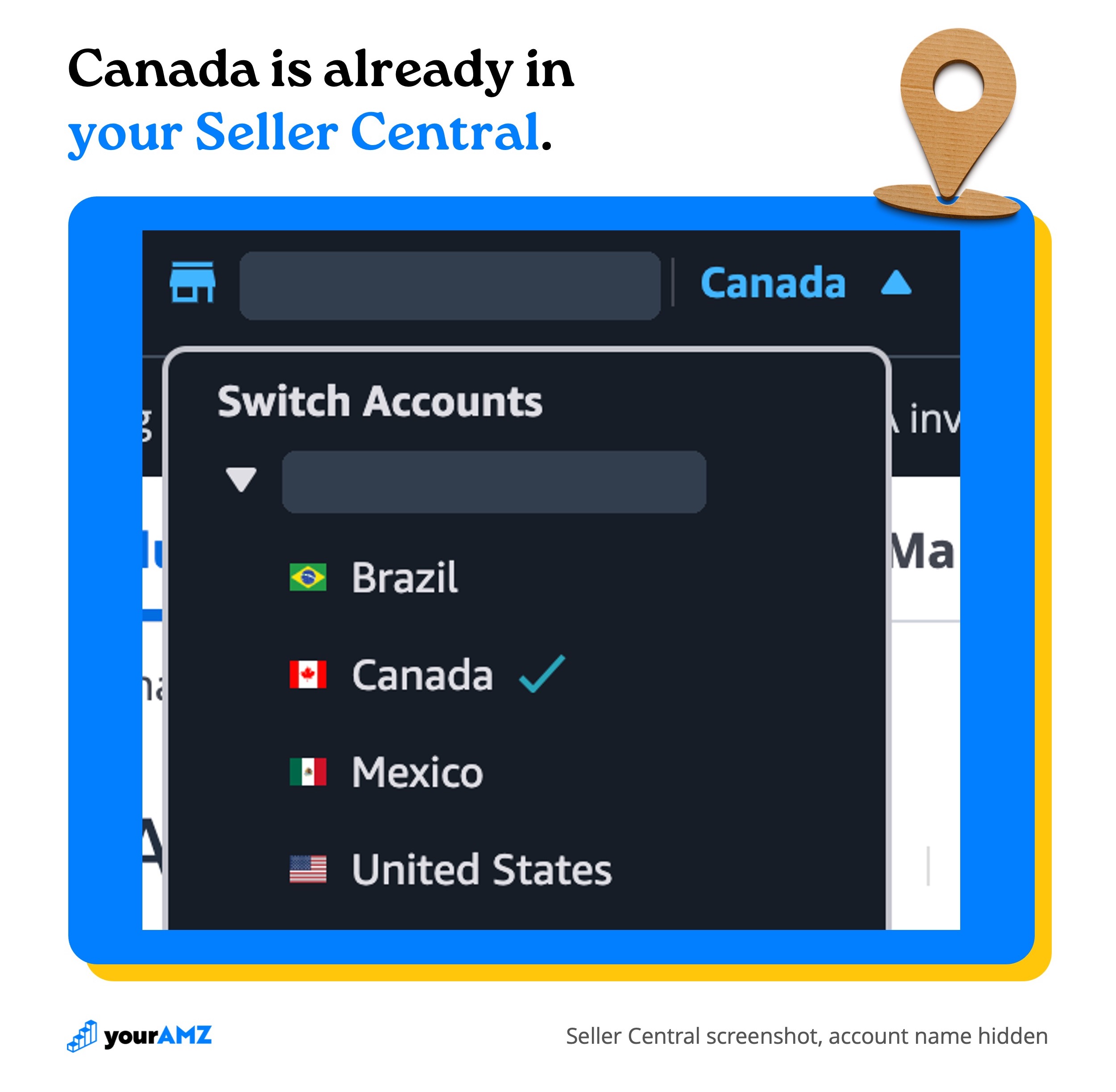
No. If you already have a US (or Mexico) seller account, you already have a Canada account through Amazon's North America Unified Account, even if you've never opened it. There are no extra fees to expand your listings into Canada. If you don't have a seller account yet, you can sign up through Amazon's account sign-up page.
To get into Canada, use the marketplace switcher in the top-left corner of Seller Central and select Canada.
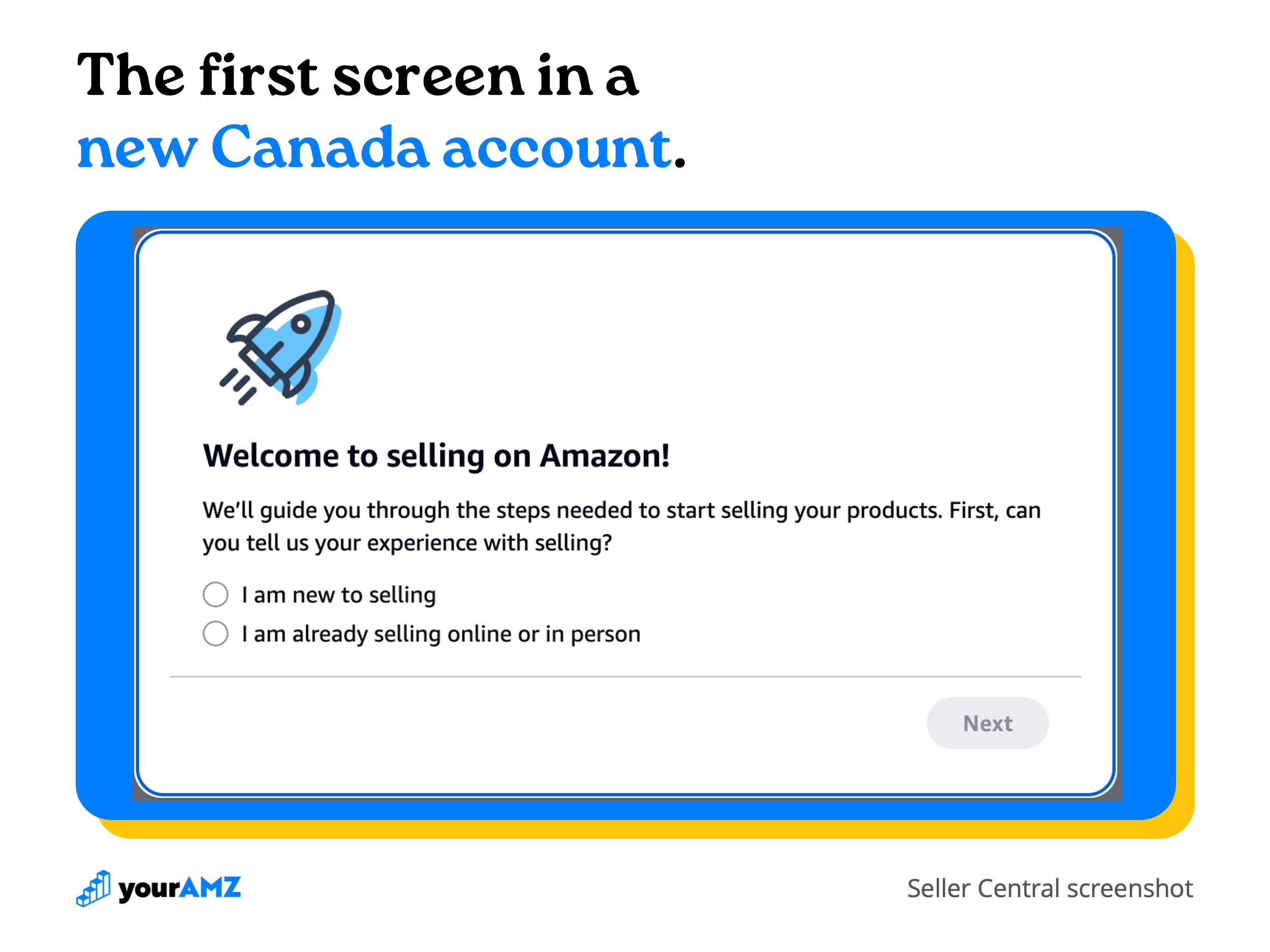
An account that has never been used in Canada may still need payment details or a quick re-verification of your business information before it can sell. If you've never set it up, the first screen you'll see is Amazon's onboarding prompt.
Can you use your US listings in Canada?
Yes, as long as the product sold in Canada carries the same UPC as the one sold in the US. In that case you can create the Canada offer from your US account, and the Canada listing shares the same ASIN and the same reviews. A brand launching into Canada with hundreds of US reviews keeps them on day one.
If the Canadian version of the product has a different UPC (new packaging, a different pack size, a Canada-only SKU), Amazon treats it as a different product. You'll create a new listing inside the Canada account. It gets its own ASIN and starts with no reviews. Our guide to UPC codes on Amazon covers how barcodes tie a product to its listing.
One trap catches brands if the ASIN ends up shared across marketplaces. When you upload Canada-specific listing images with French text, upload them to the Canada section of the Image Manager and not to "global." A global upload applies to every marketplace that shares the ASIN, so your Canada images would replace your US images too.
What does Canadian compliance require?
Your product has to meet Canadian law, and two different parties check it. Canada checks the product and its packaging when it crosses the border. Amazon checks your listing page: the images, the content, and whether your category needs documents on file. Amazon's policy is to follow the rules of the country it operates in, so a product that meets Canadian law should also meet Amazon's requirements.
Products listed on Amazon.ca must follow Canada's federal and provincial packaging and labeling rules, including the Consumer Packaging and Labelling Act and the Textile Labelling Act. What those rules ask of you depends on your product and category.
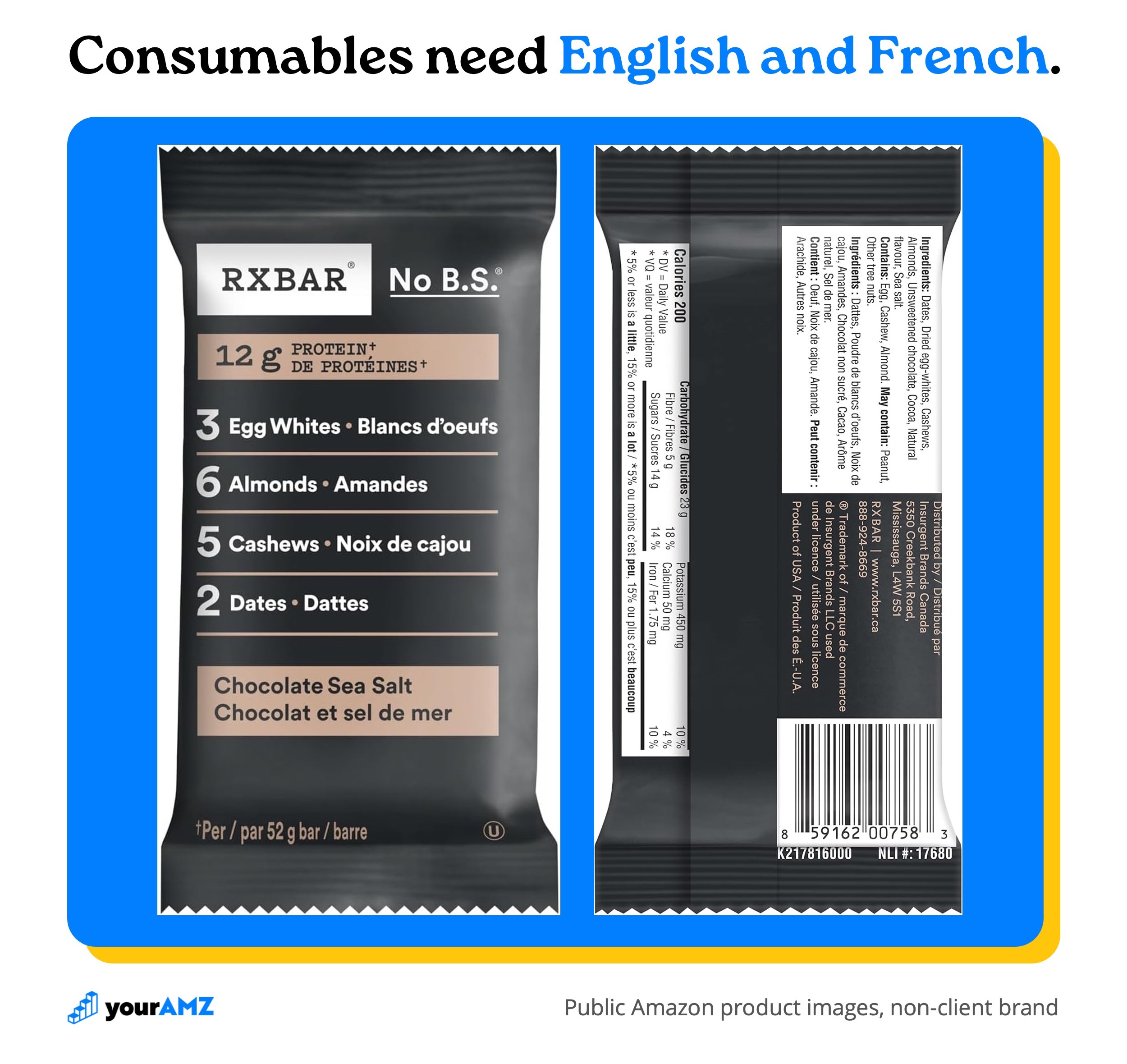
Consumable products need English and French
Food and other consumable products need both English and French on the packaging. The bar below is a good model: every claim, the flavor, the ingredient list, and the allergen statement appear in both languages, and the back panel lists a Canadian distributor alongside "Product of USA."
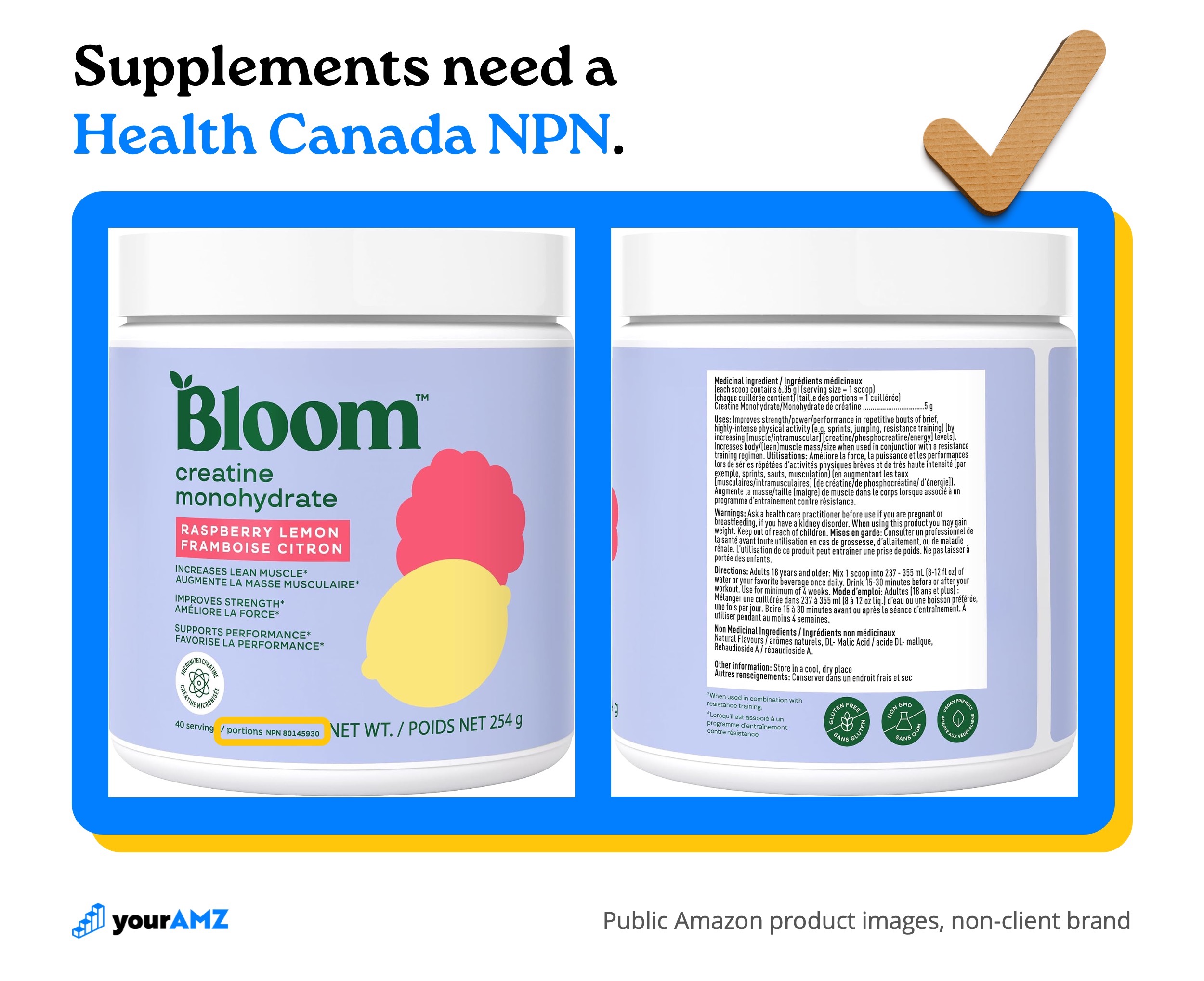
Supplements need a Health Canada product licence
Supplements and other natural health products go a step further. Health Canada requires a product licence before a natural health product can be sold, and the licence shows on the label as an eight-digit number after the letters NPN. The label also carries bilingual medicinal and non-medicinal ingredients, uses, warnings, and directions.
Amazon checks the listing and asks for documents
Amazon's checks focus on your listing page, and two kinds of flags come up most:
- Listing images. One of our clients had a Canada listing taken down because the main image showed English-only packaging. The listing stayed down until we uploaded a compliant main image.
- Category documents. A client selling electronics was asked for documentation showing the products were certified to Canadian electrical standards before the listings could stay active.
You can't upload these documents ahead of time, so you handle each request as it comes. Expect Amazon to be inconsistent. We've seen US images sit on a Canada listing for a year without a flag, and we've seen a compliant image flagged on a product that wasn't even selling yet.
Get your category confirmed before you print
We aren't experts in every category's rules, and the rules change by product type. A kitchen product can fall under food-contact rules, electrical rules, or rules for blades, depending on what it does. Before you ship, confirm your packaging with whoever designs it for you, or with a compliance specialist for your category. Some brands now print one English and French package for both countries, so they never have to manage two versions.
Should you use Remote Fulfillment or FBA Canada?
If your products qualify, Remote Fulfillment is the lower-risk way to test Canada, and it works best for low-volume SKUs. The trade-off is delivery speed: a Remote Fulfillment order takes about 10-14 days to reach a Canadian customer, while FBA Canada inventory ships with the fast Prime delivery shoppers expect. Once a SKU sells steadily in Canada, moving it into FBA Canada usually makes more sense.
With Remote Fulfillment with FBA, your Canada orders ship from your existing US FBA inventory. Amazon handles the export, customer service, and returns, and the Canadian customer pays any import duties and taxes as the importer. You pay the Remote Fulfillment fee and the Canada referral fee in place of your US fees.
With FBA Canada, you import inventory into Canada yourself and Amazon fulfills from Canadian warehouses, the same way FBA works in the US.
A third path is FBM, where you fulfill Canadian orders yourself, usually from a Canadian 3PL, which suits brands that already run their own fulfillment or have products that don't qualify for either FBA option.
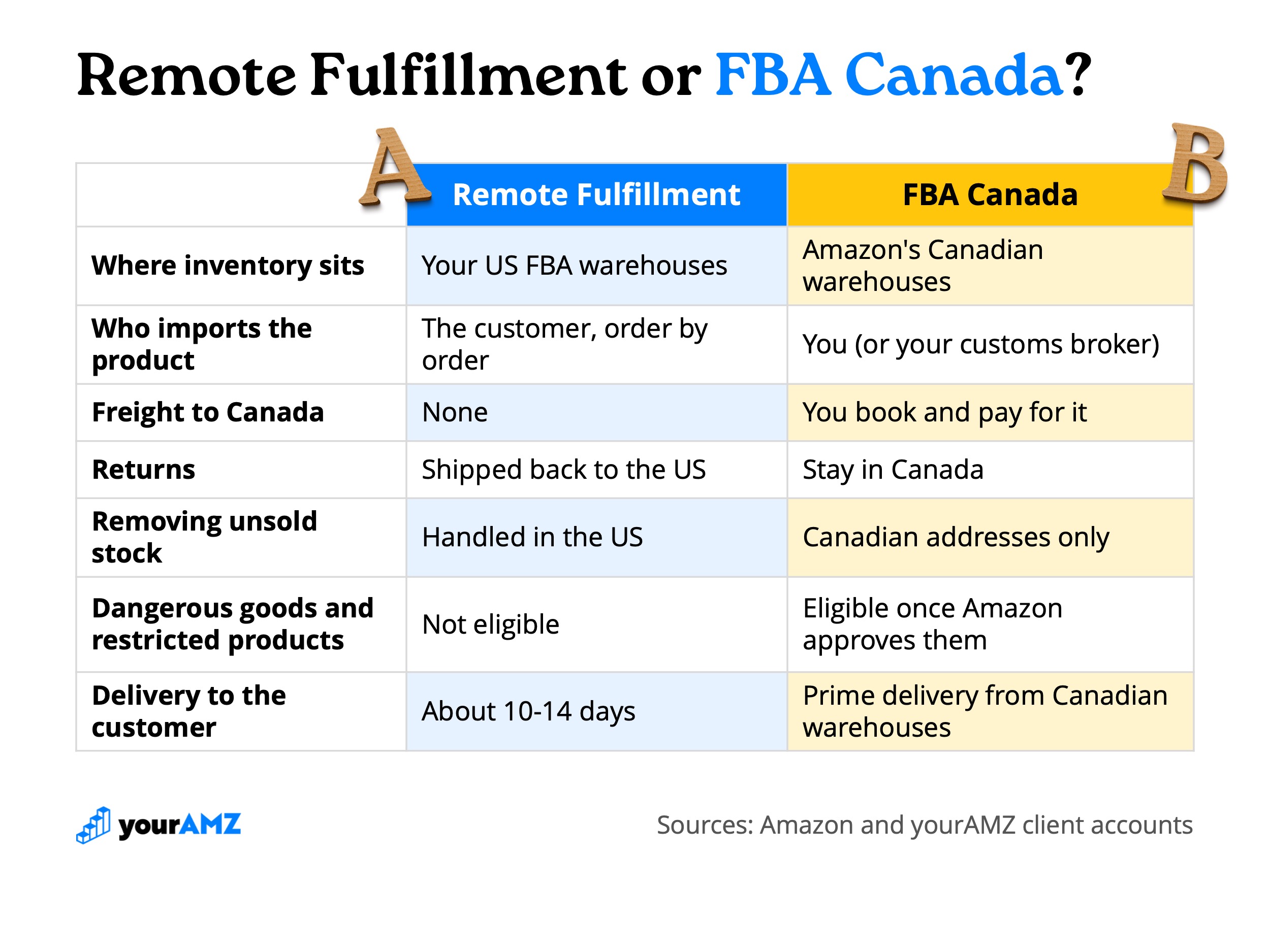
The biggest condition is compliance. Remote Fulfillment only works if your packaging already meets Canadian requirements, and Amazon will flag non-compliant products as ineligible. A brand that still needs to add French to its packaging has to fix that first either way.
On cost, the Remote Fulfillment fee includes the cross-border delivery, so compare it against the FBA Canada fee plus your full cost of getting a unit into Canada (freight, brokerage, and the risk of inventory you can't bring home). For a brand testing a few SKUs, skipping freight and import paperwork usually outweighs a higher per-unit fee. For a SKU selling steadily, FBA Canada lets you spread the freight across larger shipments.
How do you get inventory into FBA Canada?
You ship it across the border as the importer, and Amazon receives it the same way it receives a US shipment. Amazon won't act as the importer of record for FBA inventory, so that role is yours. You'll need a Canadian business number and an import-export account with the Canada Border Services Agency, and most brands hire a customs broker to handle the entry paperwork, duties, and taxes for a fee.
Creating the shipment
The shipment itself is built in Send to Amazon, just like a US shipment. You can set a US ship-from address and choose Canada as the marketplace destination, then add your SKUs and units.
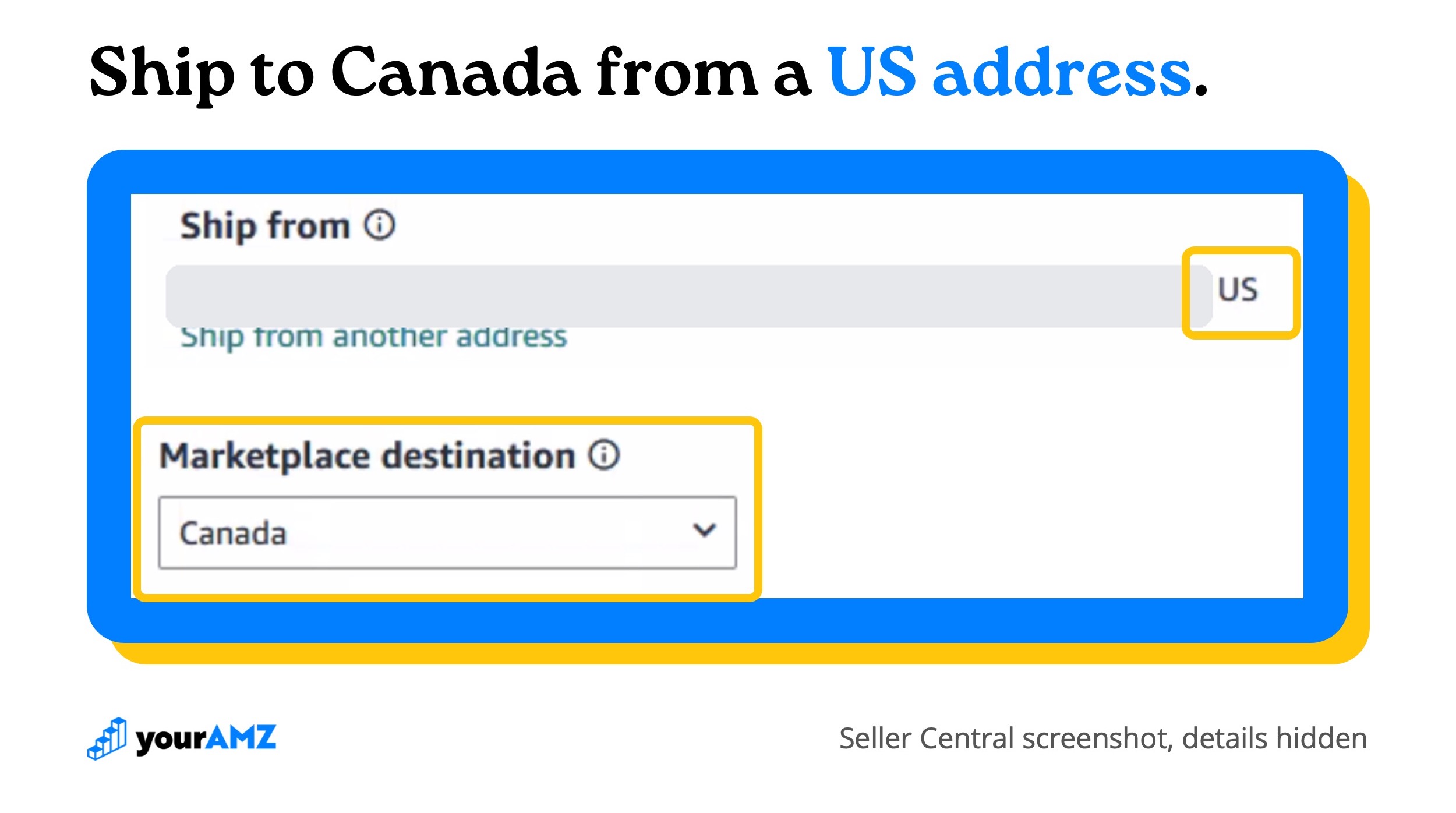
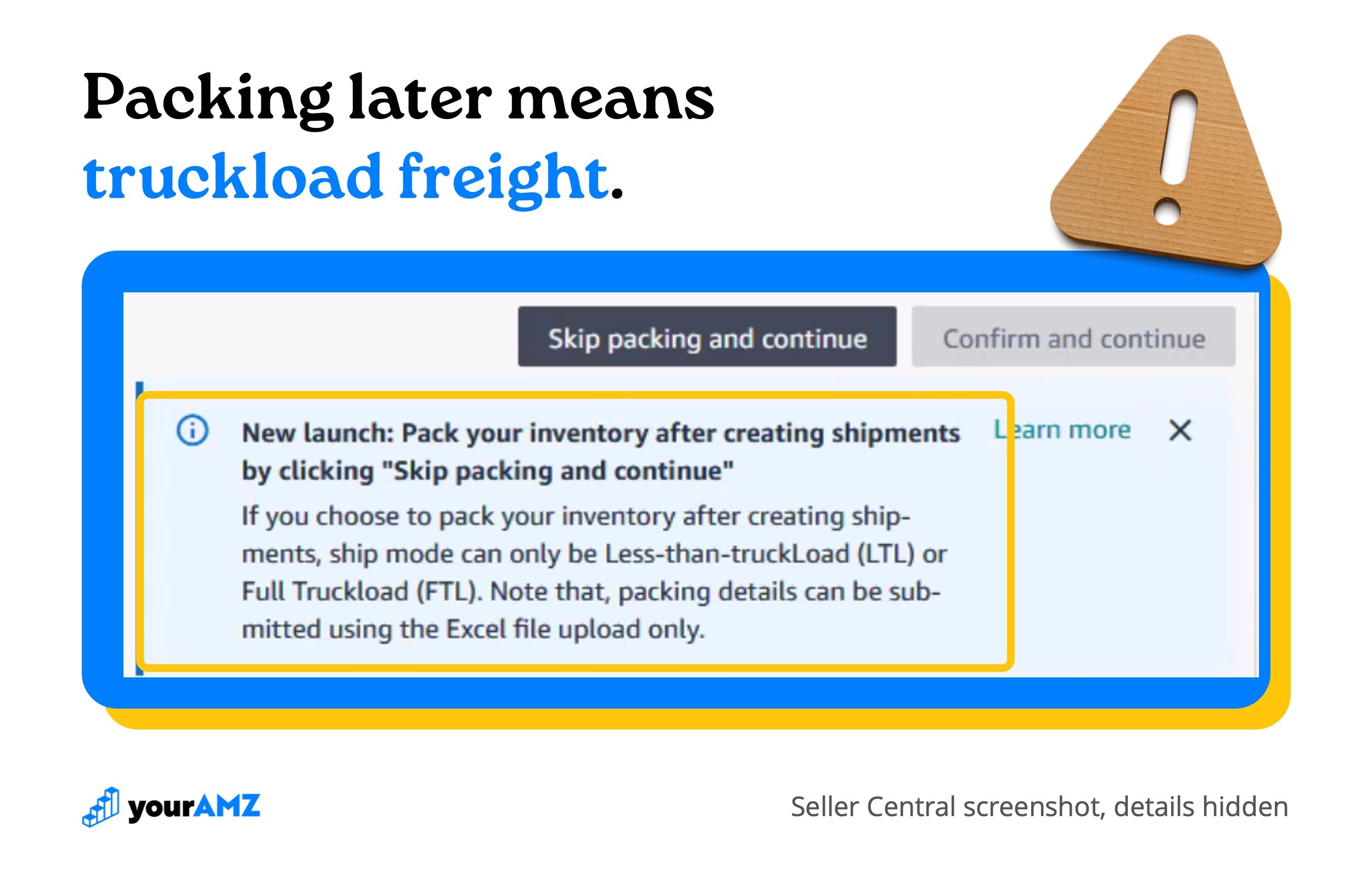
Amazon now lets you skip packing details and add them after the shipment is created. For a Canada shipment, that choice limits you to less-than-truckload (LTL) or full truckload (FTL) freight, and the packing details have to be uploaded as an Excel file.
For a smaller shipment, enter your packing details in Step 1 the same way you would for a US shipment, and you can choose small parcel delivery instead. Amazon generates the box labels, but you’ll create and pay for the shipping labels outside of Amazon.
Booking a carrier
Amazon doesn't offer partnered carriers for shipments from the US into Canada. In the US you can book an Amazon carrier pickup through Seller Central, but for Canada you need your own carrier to collect the shipment and take it across the border. That's usually more expensive than Amazon's rates, and it catches smaller brands without existing freight relationships off guard.
Once you confirm the shipment, Amazon gives you box labels for every carton and pallet labels for pallet shipments. Your carrier gets a bill of lading that tells them what they're picking up and where it's going.
Direct to Amazon or through a Canadian warehouse
You can ship straight to Amazon's Canadian fulfillment centers without a warehouse in between. A Canadian 3PL is worth having in three cases:
- You want to fulfill Canadian orders yourself (FBM).
- You want prep work or storage done inside Canada before stock goes to Amazon.
- You need somewhere for removals to go.
That last point is important because Amazon Canada only ships removal orders to Canadian addresses, so inventory you pull out of FBA Canada can't come straight back to the US.
One of our clients sells low-cost products and simply has removed units destroyed. Another, with expensive products, couldn't afford to do that. If your units are expensive, plan a Canadian address for removals before your first shipment.
What does it cost to sell on Amazon Canada?
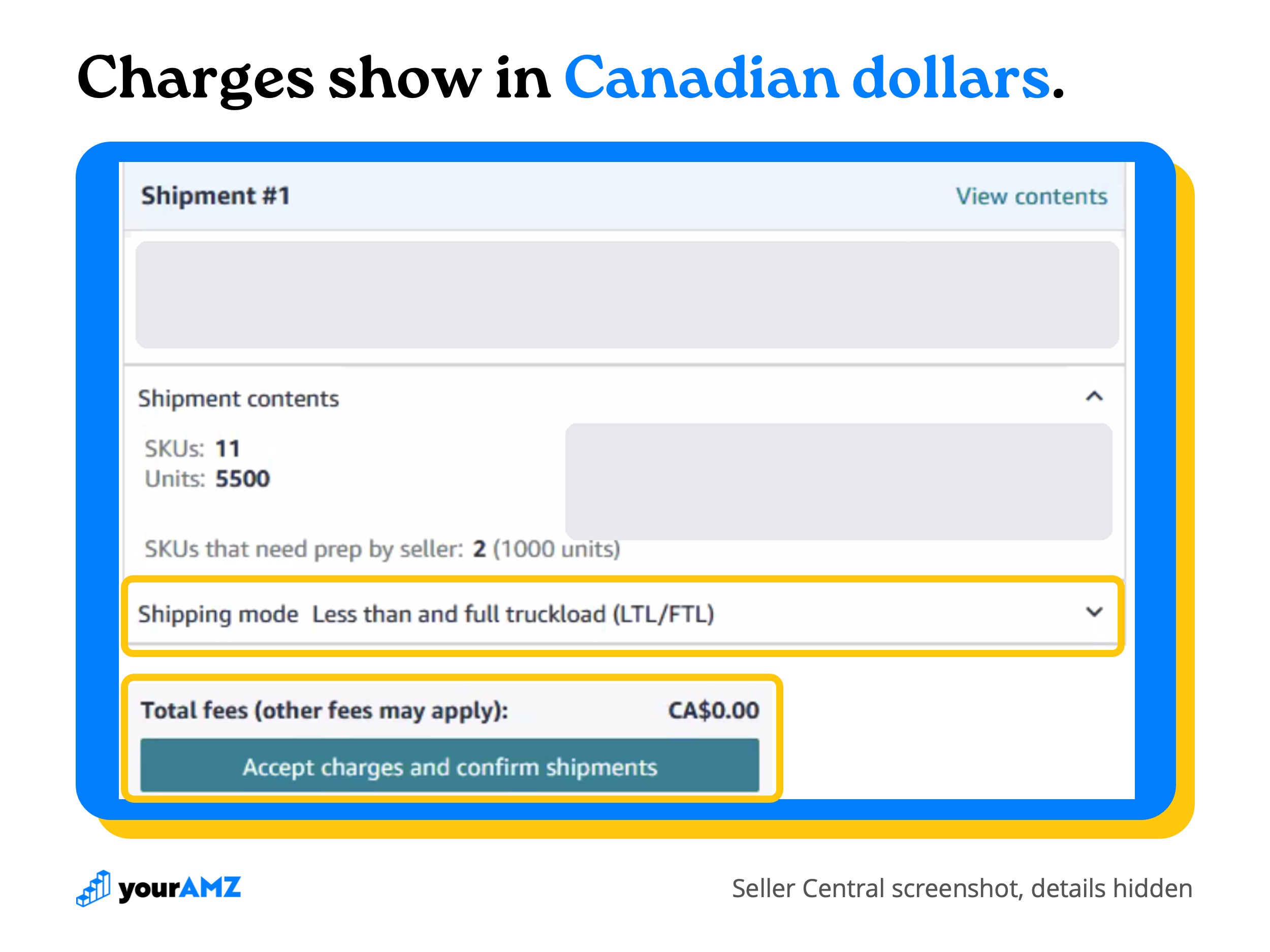
Amazon Canada charges the same types of fees as the US, all in Canadian dollars. Your sales and your fees are both in CAD, so the numbers will look higher than your US numbers even when the economics are similar.
- Referral fees. A percentage of each sale, set by category. On Amazon.ca's pricing page, most categories fall between 8% and 15% (15% is the typical referral fee for most products and categories).
- FBA fulfillment fees. A per-unit fee based on your product's size and weight, using a tier structure like the US.
- Monthly storage fees. Charged on the space your inventory takes up, the same way as US storage. Our guide to understanding FBA storage fees covers how they're calculated.
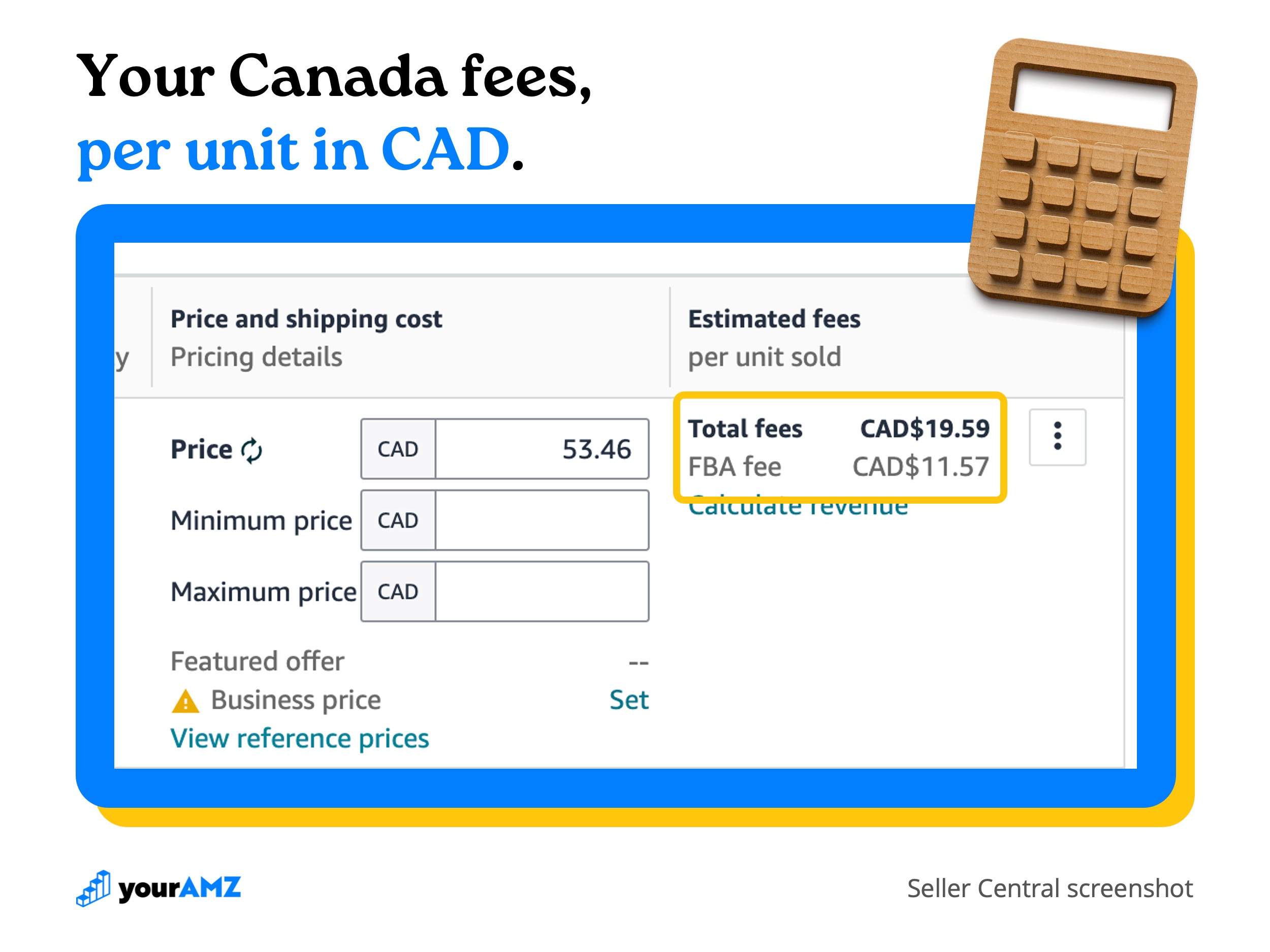
You don't need to calculate the fulfillment fee yourself. Once your listing exists in Canada, the Manage Inventory page in your Canada account shows the estimated fees for each product.
Rebuild your SKU economics for Canada
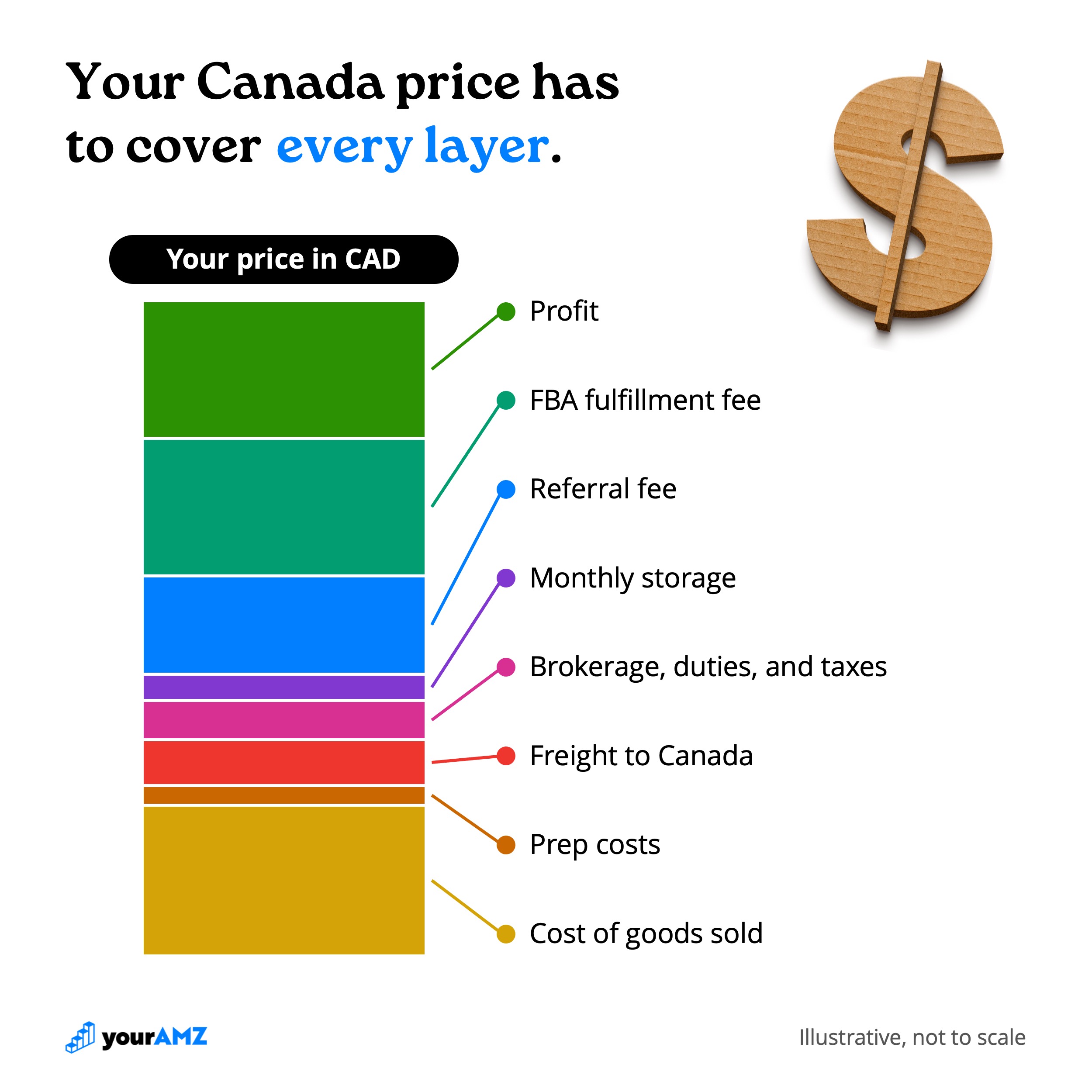
Amazon's fees are only part of the cost. Before you set Canadian prices, rebuild each SKU's profit math with every cost that changes when the product crosses the border:
- Cost of goods sold
- Prep costs
- Freight from the US to Canada
- Customs brokerage, duties, and taxes on import
- Monthly storage
- Referral fee
- FBA fulfillment fee
Our profitability calculator lays these costs out per unit so you can see your margin before you commit to a price.
Why should your first shipment to Canada be a test?
Because inventory that gets flagged in Amazon Canada is hard to recover. While a product is restricted, you can't sell it, Amazon keeps charging storage on it, and it can't be shipped back to the US. Your options narrow to a removal to a Canadian address or having the units destroyed.
For a first shipment, we recommend sending a small quantity of each SKU, often around 30-40 units, depending on how fast you expect it to sell. Shipping to Canada isn't cheap, so the test needs to be large enough to be worth the freight. For a product we think is likely to be flagged, we go smaller still. One of our clients is launching new products with ingredients Amazon often reviews for safety, and they're sending a handful of units of each to see whether Amazon flags them before committing the full order.
Once the test shipment is received and the listings stay active, send the larger order.
The same logic applies to any first-time FBA shipment in any Amazon marketplace. A housewares client of ours was launching a new product, and we recommended a test order of about 100 units. They sent around 10,000 units so they could launch the product on Amazon and on their own website, through Amazon's Multi-Channel Fulfillment (MCF), as soon as possible. The designer hadn't updated the UPC from an older product's packaging, so the new product was received into the wrong ASIN. A test shipment would have caught it with 100 units on the line. In Canada, a mistake like that comes with inventory you can't bring home.
Your Amazon Canada launch checklist
Before you ship
- Estimate what Canada is worth against your US Amazon sales.
- Open your Canada account from the marketplace switcher and add any missing payment or business details.
- Confirm which products share a UPC with the US version, and offer those listings into Canada.
- Create new Canada listings for any product with a different UPC.
- Confirm your packaging meets Canadian rules for your category, including English and French where required.
- For supplements, confirm each product has a Health Canada NPN on the label.
- Upload Canada-specific images to the Canada section of the Image Manager, not global.
- Rebuild each SKU's profit math in CAD, including freight, brokerage, and duties.
Choosing a path
- Check whether your products qualify for Remote Fulfillment.
- If they do, decide whether to test with Remote Fulfillment before moving SKUs to FBA Canada.
Shipping to FBA Canada
- Get a Canadian business number and a CBSA import-export account.
- Choose a customs broker.
- Book your own carrier from the US to Canada.
- Set up a Canadian address for removals if your units are too expensive to destroy.
- Send a small test shipment and wait for it to be received with listings active.
- Answer any compliance flags, then send the full order.
After launch
- Launch advertising campaigns in the Canada marketplace.
What happens once your inventory is live?
You're ready to send traffic to your listings. Switch to the Canada marketplace in Seller Central and launch advertising campaigns the same way you would in the US. Canada runs its own campaigns and budgets, so your US campaigns won't carry over. Build them for Canada to start driving traffic and selling through your inventory.
Unlock Your Amazon Potential
%20(1).avif)
Continue Reading
Your Amazon ads have a location blind spot (with Ken Sheehan of KnoWhere)